About Typing Tutor: Speed & Games
Learn Touch Typing with Typing Tutor Typing Tutor helps you learn touch typing, improve typing speed, and increase accuracy through structured lessons, interactive practice, and professional typing tests. Whether you're...
Learn Touch Typing with Typing Tutor
Typing Tutor helps you learn touch typing, improve typing speed, and increase accuracy through structured lessons, interactive practice, and professional typing tests. Whether you're preparing for a government typing exam or simply want to type faster, this app makes learning easy and effective.
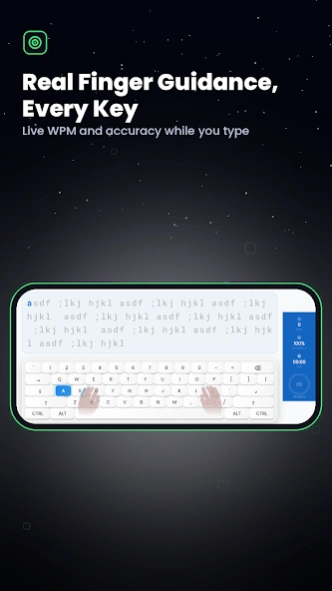
Learn the correct finger placement from the beginning and build the muscle memory needed to type confidently without looking at the keyboard. Practice step by step with Home Row, Top Row, Bottom Row, Home + Top Row, Home + Bottom Row, and complete keyboard lessons.
Unlike ordinary typing apps that only offer typing tests, Typing Tutor teaches the correct typing technique from the beginning. Learn which finger should press each key, practice the keyboard row by row, and gradually develop the muscle memory needed for fast and accurate typing.
Improve your skills with different practice modes, including Character Practice, Word Practice, Sentence Practice, and Paragraph Practice. Once you're ready, challenge yourself with 1, 2, 5, and 10-minute typing tests and track your progress with detailed WPM, accuracy, keystrokes, and personal best statistics.
Learning doesn't have to be boring. Enjoy the built-in Falling Words game, where you type words before they reach the bottom of the screen. Improve speed, reaction time, and keyboard familiarity while having fun.
Challenge yourself with Ghost Opponent Mode and compete against your previous performance to achieve a new personal best.
### Supported Keyboard Layouts
• English (QWERTY)
• Hindi – KrutiDev 010
• Hindi – Mangal Remington Gail
• Hindi – Mangal InScript
• Marathi – Mangal
• Punjabi – Gurmukhi
The app also includes Alt Code practice for special characters and supports USB and wireless keyboards through OTG for a desktop-like typing experience on your Android device.
Perfect for students preparing for SSC, High Court, Banking, Clerk, Data Entry Operator, and other competitive exams, as well as office professionals, teachers, and beginners who want to improve typing speed and accuracy.
### Features
• Learn correct finger placement
• Home, Top & Bottom Row lessons
• Character, Word, Sentence & Paragraph Practice
• Professional Typing Speed Tests
• Falling Words Typing Game
• Ghost Opponent Mode
• Alt Code Practice
• OTG Keyboard Support
• WPM & Accuracy Tracking
• Clean and easy-to-use interface
Whether your goal is to pass a typing test, improve your productivity at work, or become a faster and more confident typist, Typing Tutor gives you the tools to practice, track your progress, and achieve better results.
Start practicing today and build faster typing speed, better accuracy, and greater confidence with every lesson.
--------------------------------------------------------------------------------------------------------------------------
This App is developed at ASWDC by Rajveer Parmar (21010101139), the 4th Sem CE Student. ASWDC is Apps, Software, and Website Development Center @ Darshan University, Rajkot run by students & staff of Computer Science and Engineering Department.
Call us: +91-97277-47317
Write to us: aswdc@darshan.ac.in
Visit: http://www.aswdc.in http://www.darshan.ac.in
Follow us on Facebook: https://www.facebook.com/DarshanUniversity
Follows us on Twitter: https://twitter.com/darshanuniv
Follows us on Instagram: https://www.instagram.com/darshanuniversity/
Previous Versions
Here you can find the changelog of Typing Tutor: Speed & Games since it was posted on our website on 2023-09-25 11:02:38.
The latest version is 13 and it was updated on 2026-10-12 21:41:54. See below the changes in each version.
Typing Tutor: Speed & Games version 13
Updated At: 2026-10-04
Changes: 🎮 Added a new game
⌨️ Upgraded Typing Tutor
🚀 Improved user experience
🐞 Bug fixes and performance improvements
Typing Tutor: Speed & Games version 1.7
Updated At: 2026-04-20
Changes: * 🌍 Multi-Lingual Revolution: We now support 10 major languages! Practice typing in English, Hindi, Gujarati, Marathi, Punjabi, Bengali, Tamil, Telugu,
Kannada, and Malayalam.
* ⏱️ Precision Timers: Take control of your practice with new Timed Sessions. Choose between 1, 2, 5, or 10-minute speed tests.
* 🔄 Seamless Content Looping: Our timed practice now features infinite text looping. If you finish the lesson before time is up.
Typing Tutor: Speed & Games version 1.3
Updated At: 2024-02-25
Changes: Improve Performance
Typing Tutor: Speed & Games version 1.1
Updated At: 2023-05-19
Changes: * New Version Available